
Remote software delivery requires more than chat, video calls and project management software. Teams still need to coordinate architecture decisions, code changes, releases, incidents and handovers across locations and working hours.
Problems usually appear where tools and processes do not connect. Requirements sit in one platform, technical decisions in another, approvals happen in private messages and production context remains with a small number of engineers.
A practical remote stack should connect planning, engineering, deployment and support work. The toolset needs clear boundaries, searchable records, role-based access, visible ownership and an agreed path from ticket creation to production monitoring.
Start With the Workflow, Not the Tool List
A remote stack becomes difficult to manage when each department adds tools independently. Features overlap, integrations remain partial and developers spend more time moving between platforms than progressing work.
Begin with the software delivery lifecycle and identify where tasks, code, approvals, documentation and production signals need to connect. A typical software delivery workflow includes:
- Creating and prioritising a task.
- Assigning an owner.
- Discussing technical requirements.
- Writing and reviewing code.
- Running automated tests.
- Deploying the change.
- Monitoring performance.
- Recording important decisions and results.
The tools should support this sequence without requiring developers to copy information manually between systems.
Core Components of a Remote Tech Stack
| Technology layer | Main purpose | Common tools |
| Project management | Plan work, assign owners and track progress | Jira, Linear, ClickUp |
| Team communication | Support real-time and asynchronous discussions | Slack, Microsoft Teams |
| Documentation | Store technical and operational knowledge | Notion, Confluence |
| Source control | Manage code and review changes | GitHub, GitLab, Bitbucket |
| CI/CD | Automate testing, builds and deployments | GitHub Actions, GitLab CI, CircleCI |
| Monitoring | Track application health and incidents | Datadog, Grafana, New Relic |
The exact products matter less than the connections between them. Every tool should have a defined role, and teams should avoid using several platforms for the same type of work.
Make Documentation Part of Daily Work
Remote teams cannot depend on office conversations to share technical context. Documentation needs to be created during the work rather than added several weeks after a project is completed.
A central knowledge base should cover:
- system architecture and service ownership;
- local development setup;
- coding and review standards;
- deployment and rollback procedures;
- incident response instructions;
- common troubleshooting steps;
- onboarding guidance for new developers.
Architecture Decision Records should capture the reasoning behind major choices, including framework selection, integration patterns, data models and rejected alternatives.
Assign owners to important documents and review them whenever related systems change.
Automate the Delivery Pipeline
Repeated engineering tasks create release delays, inconsistent environments and unnecessary operational overhead. Automation standardises the workflow and helps remote teams move work forward across time zones.
A well-designed CI/CD setup can handle:
- code quality checks;
- unit and integration testing;
- dependency and vulnerability scanning;
- application builds;
- infrastructure provisioning;
- staging and production deployments;
- release validation and rollback procedures.
Builds, environment setup and production releases should not depend on one engineer’s availability.
Centralised logs, application metrics, tracing and alerting should show which service failed, what triggered the issue and which team owns the response.
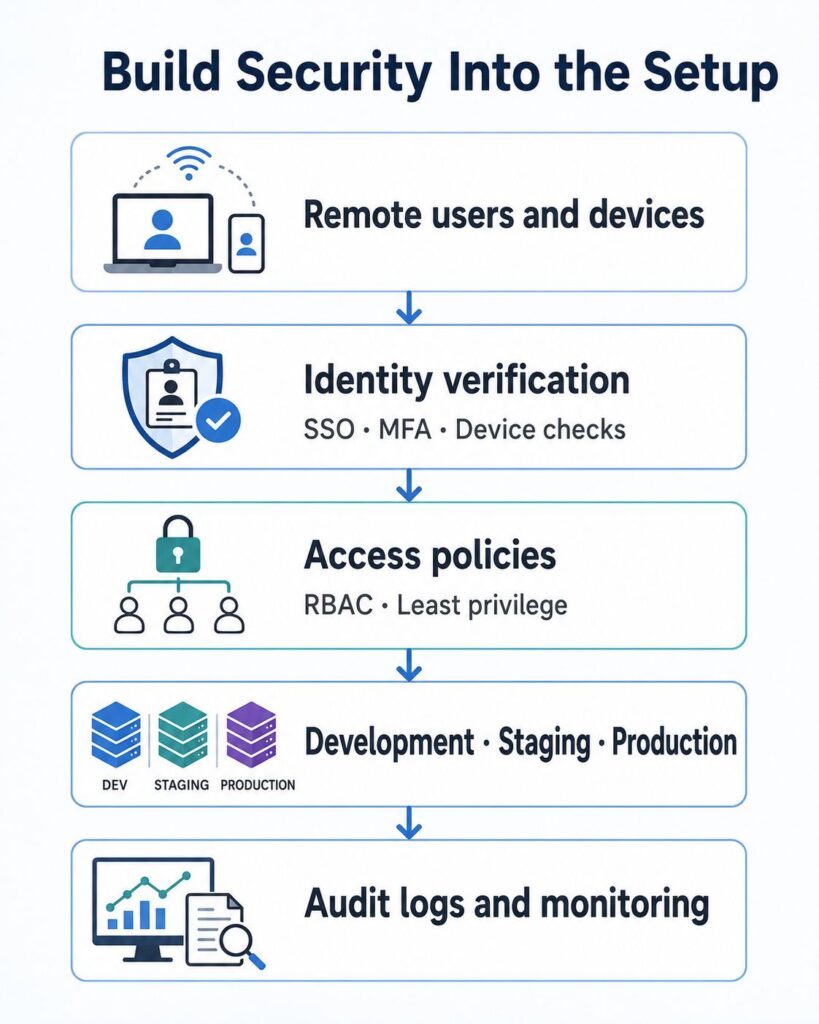
Build Security Into the Setup
Every platform in a remote technology stack creates another account, credential and access path that must be managed.
The basic controls should include:
- multi-factor authentication;
- single sign-on where possible;
- role-based permissions;
- secure password and secret management;
- encrypted connections;
- access logs and audit trails;
- regular permission reviews.
The NIST Zero Trust Architecture provides a relevant framework for managing access to enterprise resources across remote users, devices and cloud environments.
Apply least-privilege access through defined roles and project-level permissions. Developers, contractors, project leads and external specialists should receive only the access needed for their current workstream, with separate controls for production, staging and development.
The same controls apply when bringing in Salesforce expertise for integrations, automation or platform development. Businesses may hire salesforce developer resources that can work with existing RBAC policies, code review rules, CI/CD gates and release documentation.
Reduce Tool Switching
A crowded toolchain slows down remote teams. Developers spend too much time switching between ticketing systems, documentation spaces, inboxes and chat threads just to rebuild the context around a task.
Regular audits help identify redundant platforms and broken handoffs. Fewer systems usually mean cleaner reporting and less coordination overhead.
Communication rules should be clear:
- Use chat for short discussions and urgent coordination.
- Use the project management system for tasks and ownership.
- Use documentation for decisions and long-term knowledge.
- Use incident tools for production problems.
- Use meetings only when live discussion provides clear value.
Measure Whether the Stack Is Working
A useful stack should reduce friction and improve delivery.
| Basic activity metric | More useful performance metric |
| Number of collaboration tools | Time spent switching between tools |
| Messages sent | Time required to resolve blockers |
| Hours online | Cycle time from development to deployment |
| Number of meetings | Percentage of work completed asynchronously |
| Total deployments | Deployment success and rollback rates |
| Team size | Reliable delivery capacity per engineer |
The DORA software delivery performance metrics provide a practical reference for evaluating delivery throughput and instability.
Developer experience is a delivery metric. Slow local environments, flaky CI jobs, weak code search, stale documentation and approval queues all reduce engineering throughput.
Useful questions include:
- How long does it take a new developer to run the product locally?
- Can engineers find the owner of a service quickly?
- How much manual work is required for a release?
- Can teams continue working when colleagues in another time zone are offline?
- Are incidents detected and assigned without manual investigation?
Scale Without Expanding the Tool Sprawl
The stack should support the full software delivery lifecycle: planning, coding, review, deployment, documentation and production support. Each stage needs a defined system of record and a clear owner.
Keep the number of platforms limited. Connect the issue tracker, repositories, CI/CD pipeline, documentation space and observability tools where data needs to move automatically.
Every new tool should have a specific operational case. Avoid adding software that duplicates tickets, notifications or engineering context.
Distributed teams scale more cleanly when the tooling model remains predictable. Standard workflows, current runbooks, automated delivery and role-based access reduce onboarding time and limit key-person dependency.